


Student Account
學生帳戶
01
Receive Your Credentials
接收您的憑證
Once approved, you will receive an SMS from ENGGO APP containing your Username and Initial Password for signing up an account. If students don’t have a mobile phone, we can use your parent’s number instead.
一旦獲得批准,您將收到來自 ENGGO APP 的短訊,裡面包含您的 用戶名 (Username) 和 首次密碼(Initial Password) 來完成註冊。如果學生沒有手機,我們可以使用您父母的號碼。

02
Sign Up
註冊
Click on ‘Sign Up’, enter your username and click ‘Next Step’ to continue. Complete the registration form by answering all the required questions.
點擊 ‘Sign Up’ ,然後輸入您的 用戶名 (Username) 並點擊 ‘Next Step’ (下一步) 繼續。回答所有必填問題來完成註冊表。


03
Register for Parent Account
登記家長帳戶
Under the Parent section, input the parent's name and mobile number to register for the Parent account. An SMS will be sent to the parent's registered number for activating the account. Click ‘Next Step’ to continue.
在「家長」部分,輸入家長的姓名和手機號碼以註冊家長帳戶。系統將向家長註冊的號碼發送一條短信,用於啟動帳戶,並點擊 ‘Next Step’ (下一步) 繼續。

04
Setup Password
設定密碼
Enter the initial password received via SMS on your mobile phone at the first step, and then input your desired password under the ‘New password’ and click ‘Setup’ to complete the changing password process.
輸入之前發送到您手機簡訊中的首次密碼 (Initial Password),然後於 ‘New password’ (新密碼) 輸入你的自訂密碼並點擊 ‘Setup’ (設定) 以建立密碼。


Parent Account
家長帳戶
01
Receive Your Credentials
接收您的憑證
After the student’s account is successfully created, an SMS with the Parent’s Username and Initial Password will be sent to the parent’s registered phone for login purposes.
在學生帳戶成功創建後,ENGGO APP 將會向家長的手機發送一條包含 用戶名 (Username) 和 首次密碼 (Initial Password) 的短訊,以便登錄。

02
Login
登錄
Enter your Username and the Initial password and click Login. Once you have successfully logged in, the ENGGO APP will save this login information for automatic login. It will not be required to sign in each time. Nonetheless, we recommend changing the password to something more memorable.
輸入用戶名(Username)及首次密碼(Initial Password) 並點擊 ‘Login’(登錄) 。成功登錄後您不需要每次都輸入密碼。然而,我們建議您將密碼更改,以易於記住。

03
Change Password
更改密碼
To change your password, first log out of your account .
若要變更您的密碼,請先登出您的帳戶。


04
Reset Password
重設密碼
Click ‘Forgot Password?’ and enter your Username. Click ‘Next Step’, enter your new preferred password and click ‘Reset’. A One-Time Password (OTP) will be sent to your registered mobile. Enter the OTP and click ‘Submit’ to complete the password change process.
點擊 ‘Forgot Password?’ (忘記密碼) 並輸入您的 Username (用戶名),點擊 ‘Next Step’ (下一步) 繼續。輸入您的新自訂密碼,然後點擊 'Reset' (重設)。一次性密碼(OTP) 將發送到您註冊的手機上。輸入密碼,然後點擊 'Submit' (提交) 以完成密碼更改流程。


Tuition Payment 學費支付
Tuition payment reminders will be delivered to the parent account with details about the student's upcoming payments.
We accept payments through the following methods:
-
Faster Payment System (FPS): Upload the bank slip that clearly shows the transaction number and date.
-
Bank Transfer: Upload the bank slip that clearly shows the transaction number and date.
-
Cash: Upload the clear photo of the receipt received from the ENGGO centre counter.
Please ensure you have uploaded the payment proof with a clear image onto the app for the system to acknowledge your transaction.
學費付款提醒將發送到家長帳戶,內容包含有關學生即將到期的學費詳情。
我們接受以下方式付款:
-
快速支付系統(FPS): 上傳清晰顯示交易編號和日期的銀行轉帳收據。
-
銀行轉帳: 上傳清晰顯示交易編號和日期的銀行轉帳收據。
-
現金支付: 上傳從ENGGO中心櫃檯獲取的收據之清晰圖像。
請務必在應用程式中上傳您的支付憑證,確保憑證清晰可見,以便系統能夠正確識別您的交易,完成學費支付。
Upload Payment Proof
上傳支付憑據
Click 'Bills' from the menu. Under the ‘Latest Bill’ tab, check the box to select the bill you need to submit the proof. Click ‘Submit Payment Proof’ to continue uploading the image of the payment proof.
點擊選單中的 'Bills' (帳單),在 ‘Latest Bill’ (最新帳單) 標籤下,勾選方塊以選擇您需要提交證明的帳單。 點擊 ‘Submit Payment Proof’ (提交付款證明) 以繼續上傳支付憑據的圖像。


Once the proof is successfully uploaded, the Payment Status changes from Pending Payment to Pending Approval. After the payment has been approved by the centre, the bill will be moved under the Payment History section with the status 'Success' in the Payment Status.
成功上傳憑證後,付款狀態將從 ‘Pending Payment’(待付款) 更改為 ‘Pending Approval’(待批准)。中心核實付款後,帳單將移至 ‘Payment History’(付款記錄) 部分,並在付款狀態中顯示 ‘Success’(成功)。


Swap Classes 課程調整
Students who need to change their class time due to a leave of absence can submit leave and make-up applications via the parents’ account. Students who have informed the centre of their leave through this app can swap to another lesson at the same level. You can check available time slots directly in our app.
You must first submit a leave application before you can choose an available make-up session.
因請假需更改上課時間的學生,可以透過家長的戶口提出申請並安排補堂。您可以直接在應用程式中查看同一級別的其他上課時段。
您需要先提交請假申請,然後才能選擇一個補課時段。
01
Apply Leave
申請請假
Apply for Leave:
Click ‘Apply Leave’ at the Home page.
申請請假:
點擊 ‘HOME’(主頁)上的 ‘Apply Leave’(請假)。

Fill out the Form:
Complete the form with the required details, including:
-
Select Class
-
Select Lesson
-
Leave Type (e.g. sick or personal)
填寫表格:
完成表格,提供所需的詳細信息,包括:
-
選擇班級 (Class)
-
選擇課堂 (Lesson)
-
請假類型(例如:病假 sick 或事假 personal)


Submit your Application:
Click 'Submit' to Once you have submitted the application, you can review all your applications under the ‘Record’ tab.
提交申請:
提交申請後,您可以在「Record」標籤下查看所有申請。

Confirmation:
In the ‘Record’ tab, you will see ‘approved’ next to the status, indicating that your application has been successfully processed.
確認:
在「Record」標籤中,您將看到狀態旁顯示「已批准Approved」,這表示您的申請已成功處理。

Remarks:
Students should apply for leave as soon as they become aware of their unavailability. This notifies the centre of their absence, allowing the teacher to prepare accordingly and freeing up the seat for others who may wish to request a class swap.
Students are entitled to one free class swap per month if their leave application is successfully submitted and approved through this app. To ensure that you secure a make-up opportunity, please note that personal leave applications need to be submitted at least one day in advance, while sick leave applications should be made at least two hours prior to the class.
備註:
學生應在確定無法上課時盡快申請請假。這樣可以通知中心他們的缺席情況,讓老師做好相應的準備,並釋放學位給其他希望課程補堂的學生。
通過本應用程式成功提交並獲得批准請假的學生,每月可享有一次免費的調堂機會。為確保能獲得補課機會,請注意,事假申請需至少提前一天提交,而病假申請需在上課前至少兩小時提出。
After successfully submitting your leave application, you can proceed to ‘Swap Class’.
成功提交請假申請後,您可以繼續申請調課。
02
Swap Class
申請調課
Apply for a Class Swap:
Click ‘Swap Class’ on the Home page.
申請調課:
點擊 ‘HOME’(主頁)上的 ‘Swap Class’(調課)。

Fill out the Form:
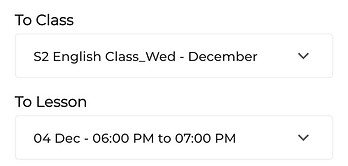
Provide all necessary details by selecting the date & time of the original class and your preferred makeup class.
填寫表格:
請選擇原本的課堂及日期時間,以及您想選的補課課堂及日期時間。

Submit Application:
Click ‘Submit’ to finish the process.
遞交申請:
點擊「提交」以完成過程。

View Status:
Students’ requests for a swap class will be sent for approval. You can check the status under the ‘History’ tab. While your status is still ‘Pending’, you can withdraw your application and choose another available time slot from the list.
查看狀態:
學生的調課請求將提交審批。您可以在「歷史」標籤下檢查狀態。在您的狀態顯示為「待批」時,您仍然可以撤回申請並從列表中選擇其他可用的時間段。

Remarks:
Changes to your schedule will not be accepted again once the application is approved, as each student is allowed to change their schedule only once per month.
備註:
一旦申請獲得批准,您將無法再次更改課程安排,因為每位學生每月僅允許更改一次課程。